Key Takeaways
- The right booking software depends on whether you bill insurance — that single factor splits the market in two.
- Calendly and Acuity are general scheduling tools that handle booking well but have no automatic cancellation enforcement or session credit tracking.
- SimplePractice is purpose-built for insurance-billing therapists — overkill and expensive for private-pay practitioners.
- Merkora is the strongest option for private-pay coaches and therapists who want booking, cancellation enforcement, session credits, and course hosting in one platform.
- Don't evaluate booking software by scheduling features alone — evaluate it by what happens around the booking: payment, enforcement, and client history.
In this article
Booking software is one of the first tools a private practice owner sets up — and one of the first they outgrow. Calendly works fine when you have a few call types and don't charge upfront. But once you're running a practice with cancellation policies, prepayments, and returning clients, you need something built for that reality.
This comparison covers five tools: Calendly, Acuity Scheduling, Cal.com, SimplePractice, and Merkora. Each has a different focus. The goal is to match the tool to where your practice actually is.
What to look for in booking software for a private practice
Generic scheduling tools and practice-specific tools solve different problems. Before comparing options, here's what matters most for a coaching or therapy practice:
- Cancellation policy enforcement — can it charge a fee automatically when a client cancels late?
- Prepayment and deposit collection — does it hold a card on file or require full payment upfront?
- Client history — can you see past sessions, notes, and payment history for a returning client?
- Package and credit management — can clients buy a 5-session block and draw down on it?
- Public profile — does it give you a bookable page you can share, or do you need a separate website?
With those in mind, here's how each tool stacks up.
Calendly
Calendly is a horizontal scheduling tool — it's designed for anyone who books meetings, not specifically for practitioners. That makes it fast to set up and familiar to clients, but shallow on practice-specific needs.
What it does well: Clean booking flow, simple event types, solid calendar integrations, good free tier for basic use.
Where it falls short: No real cancellation policy enforcement. No client history or notes. Payment is Stripe pass-through only — no deposit logic, no credit system. You can't give a client a "5-session package" natively.
Best for: Early-stage coaches who need a bookable link fast and aren't yet managing cancellations or packages.
For a deeper comparison with coaching-specific tools, see Coaching Software vs Calendly.
Acuity Scheduling
Acuity (owned by Squarespace) is a step up from Calendly for service businesses. It has intake forms, packages, and basic payment collection built in.
What it does well: Intake forms that attach to bookings, package/coupon support, client-facing rescheduling, decent Stripe/PayPal integration.
Where it falls short: Cancellation policy enforcement is manual — it doesn't automatically charge a late-cancel fee. The UI is dated. No built-in client portal with session history. For therapy-specific workflows it misses HIPAA compliance on lower tiers.
Best for: Coaches who want more than Calendly but don't need therapy-grade compliance or deep practice management.
Cal.com
Cal.com is an open-source scheduling tool with a generous free plan and strong developer extensibility. It's a good fit for tech-savvy solopreneurs who want control.
What it does well: Free hosted tier, self-hostable, good API access, active open-source community, clean booking UX.
Where it falls short: No practice-specific features out of the box. Packages, credit systems, and cancellation enforcement require custom setup or third-party integrations. Not designed for client history or notes.
Best for: Technical practitioners who want a cheap, flexible base they can build on top of.
SimplePractice
SimplePractice is purpose-built for therapy and counseling practices. It covers the full clinical workflow: notes, insurance billing, HIPAA compliance, telehealth.
What it does well: HIPAA-compliant client portal, clinical documentation, insurance billing, integrated telehealth, secure messaging.
Where it falls short: It's a clinical practice management system, not a coaching or course platform. Expensive for solopreneurs (starts at $29–$99/month). Overkill if you don't need insurance billing or clinical notes.
Best for: Licensed therapists who bill insurance and need full clinical documentation. Not the right fit for coaches or unlicensed practitioners.
For more on therapist-specific booking options, see Online Booking for Therapists.
Merkora
Merkora is built specifically for coaches and therapists who sell sessions, packages, and courses together. It handles bookings as part of a larger practice context — not as a standalone scheduling widget.
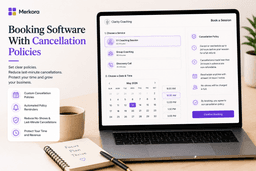
What it does well: Built-in cancellation policy with automatic fee enforcement, session credit system (clients buy packages and draw down), client history visible to the practitioner, public practice page with bio and service listings, course and live program hosting in the same platform.
Where it falls short: No insurance billing or clinical documentation. Smaller integration ecosystem than Calendly or Acuity. Not the right choice if clinical compliance is a hard requirement.
Best for: Coaches and non-clinical therapists who want booking, packages, cancellation enforcement, and courses managed in one place — without stitching together three separate tools.
If reducing no-shows is your primary concern, see How to Avoid No-Shows as a Coach or Therapist for the specific policies and reminders that work.
Quick comparison table
| Feature | Calendly | Acuity | Cal.com | SimplePractice | Merkora |
|---|---|---|---|---|---|
| Cancellation enforcement | — | Manual | — | Partial | Automatic |
| Session packages / credits | — | Basic | — | — | Yes |
| Client history | — | Partial | — | Full (clinical) | Yes |
| Course / program hosting | — | — | — | — | Yes |
| Free plan available | Yes | Trial only | Yes | Trial only | Yes |
| Insurance / clinical billing | — | — | — | Yes | — |
Which booking software fits your practice?
If you're in early days and just need a bookable link, Calendly gets you there fast. If you want intake forms and packages without a monthly commitment, Acuity is a reasonable middle step.
If you bill insurance and need clinical documentation, SimplePractice is the right tool — and the extra cost is justified.
If you're a coach or non-clinical therapist managing sessions, packages, cancellation policies, and courses — and you're tired of stitching together separate tools — Merkora is designed for exactly that workflow. You can start free and see if it fits before committing.
Frequently asked questions
What is the best booking software for private practice?
For insurance-billing therapists: SimplePractice. For private-pay coaches and therapists: Merkora (booking + cancellation enforcement + credit packages) or Acuity Scheduling (booking + packages, manual enforcement). Calendly works for basic scheduling but lacks practice management features.
What booking software automatically enforces cancellation policies?
Merkora. Most booking tools let you write a cancellation policy, but very few charge the fee automatically when a client cancels late. Merkora charges the fee without any manual action from you.
Is Calendly good for a private practice?
Calendly is good for basic scheduling. It falls short for private practice because it has no automatic cancellation enforcement, no session credit tracking, no course hosting, and no professional practice page. Most practitioners outgrow it within their first year.
What is the difference between Acuity and Calendly for private practice?
Acuity is a step up from Calendly for practitioners — it has intake forms, package support, and card-on-file collection. Neither has automatic cancellation fee charging. For private practice use, Acuity handles more, but both lack the enforcement and credit tracking that purpose-built tools provide.