Key Takeaways
- The typical coaching stack is five to seven tools costing $150–$300/month, assembled one problem at a time rather than designed.
- Only four functions are genuinely non-negotiable: a page people land on, booking, payments, and video.
- The real cost isn't the subscriptions — it's the reconciliation work between tools that don't share a client record.
- Most stacks contain at least one tool that exists only to connect two other tools. That's the first thing to cut.
- Consolidate in the order clients experience: page and booking first, payments second, courses last.
In this article
Most coaching tech stacks weren't chosen. They accumulated — Calendly because scheduling emails got exhausting, Stripe because someone needed to pay, a course platform because a client asked for something recorded, Zapier because none of them knew about each other.
The result works. It also costs somewhere north of $200 a month and requires you to be the integration layer between five products.
What does a typical coaching tech stack look like?
Almost identical from coach to coach, which is itself informative:
- A website or Linktree page — where people land
- Calendly or Acuity — scheduling
- Stripe or PayPal — payments
- Zoom — sessions
- Teachable, Kajabi, or Google Drive — courses and materials
- Mailchimp or ConvertKit — email
- Often: Notion or a spreadsheet — client tracking
- Sometimes: Zapier — connecting the above
Seven tools, four logins for the client, and one person — you — holding the whole thing together mentally.
What does the average stack actually cost?
Run the arithmetic honestly. Scheduling at $15–20, a course platform anywhere from $40 to $149, email at $20–30, a website at $16–25, Zoom at $15, plus Zapier at $20 if you're automating anything. That's $130–$260 monthly before transaction fees.
The subscription cost is the visible part and the smaller part. The real cost is weekly: checking two places before a session, copying a booking into a spreadsheet, reconciling Stripe against a calendar, manually granting course access after a payment.
Pro tip
Which tools are genuinely non-negotiable?
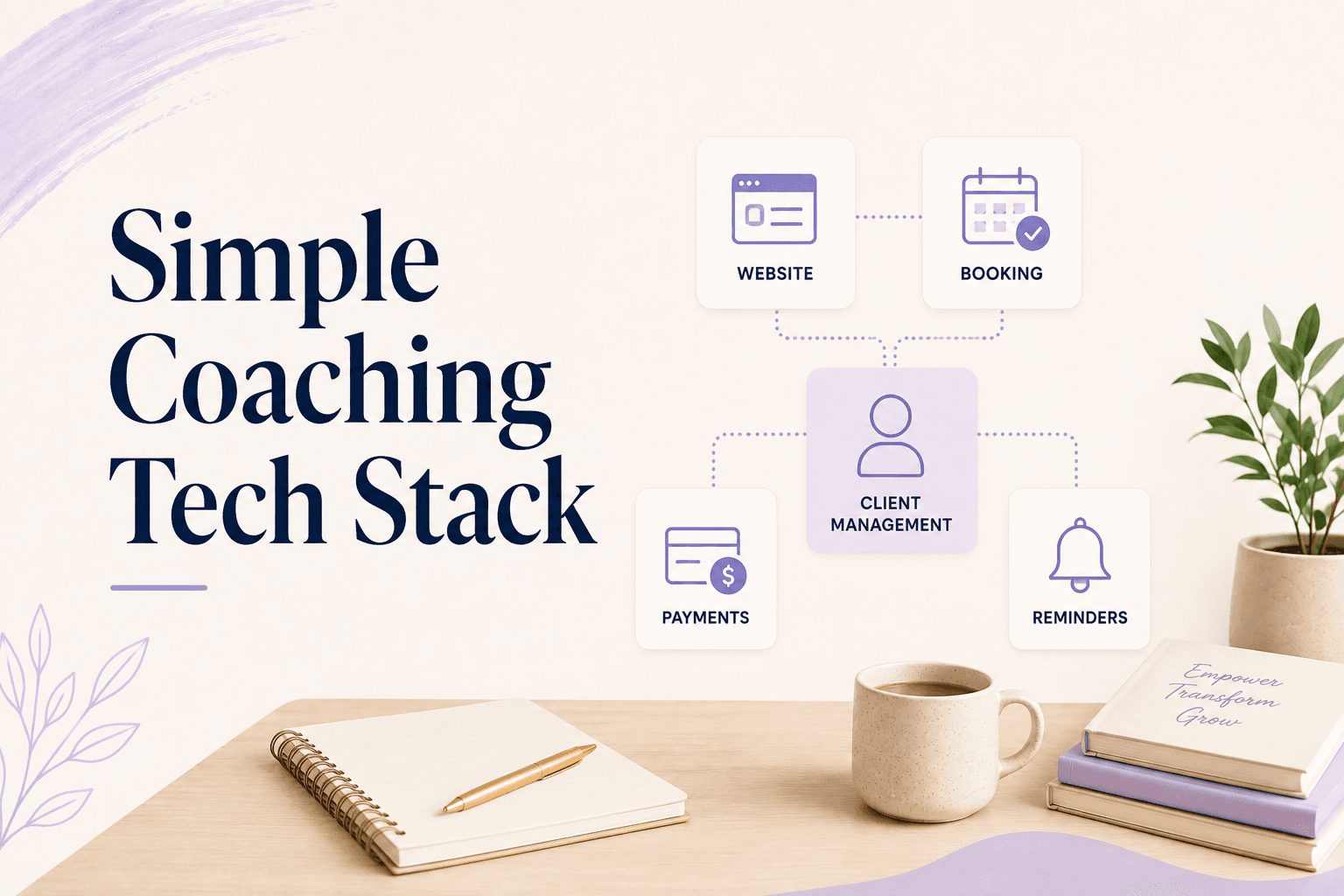
Four functions, not four products:
- A page people land on. Somewhere with your offers, your credibility, and a next step.
- Booking. Self-service, with your real availability and timezone handling.
- Payments. Taken at booking, not chased afterwards.
- Video. Reliable, joinable from a link.
Everything else is conditional. Email marketing matters when you have an audience to market to. A course platform matters when you have a course. A CRM matters when you have a pipeline. Adding them before the condition is met is how stacks get to seven tools.
The fifth function people forget is the client record — but it shouldn't be a separate tool. If your booking and payments run in one place, the record is a byproduct. If they don't, you'll buy a CRM to solve a problem your stack created.
Note what's conditional but often treated as essential: a separate domain and website. A practice page on a platform subdomain converts perfectly well in year one. Buy the domain when the brand is worth protecting, not as step one.
What can you cut without losing anything?
Start with these three categories, in order:
- Glue tools. Any tool whose only job is connecting two other tools is a symptom, not a solution. If Zapier is load-bearing in your business, the tools it connects are the problem.
- Duplicate functions. A website builder with a booking feature plus a separate scheduling tool. A course platform with email plus a separate email tool. Pick one and turn the other off.
- Aspirational tools. The email platform with 40 subscribers. The course platform hosting one unfinished course. These cost money monthly for a future that hasn't arrived.
Cancelling an aspirational tool isn't giving up on the plan — you can re-subscribe in ten minutes when the plan becomes real.
A quick audit that takes twenty minutes: open your card statement, list every recurring software charge, and next to each write the last date you opened it. Most coaches find one subscription they'd forgotten entirely and one they're paying an annual rate for while using a free-tier amount of it.
The three-tool stack
The leanest viable setup for a working practice:
- One platform that holds your page, booking, payments, packages, and client records
- Video — either built into the platform or one dedicated tool
- Email — only once you have a list worth sending to
There's an honest trade here. A dedicated scheduling tool will have more scheduling features than a platform that also does five other things — more calendar integrations, more routing rules, more edge cases handled. If one of those edge cases is central to how you work, keep the specialist tool.
For most solo practices it isn't. The features that get lost in consolidation are ones you weren't using, and the thing gained — one client record — is the one you check every day.
This isn't a minimalism exercise. The reason to consolidate is that a client who books, pays, and enrolls in one place produces one client record instead of four — which is the difference between running your business from one tool and operating a filing system.
How to consolidate without breaking your business
Don't migrate everything in a weekend. Move in the order clients experience your practice, and keep the old tool running until the new path is proven:
- Page and booking first. This is where new clients enter, so it's where consolidation pays off soonest. Keep the old scheduler live for two weeks with existing bookings.
- Payments second. Move new bookings to the new checkout; let existing subscriptions run out where they are.
- Courses last. These have the fewest active users at any moment and the highest migration friction. Move them when the rest is stable.
- Cancel deliberately. Set a calendar reminder for each old subscription. Unused tools renew silently for months.
If you're evaluating what to consolidate into, the practical comparison is in how to choose online coaching software and the 2026 platform comparison.
Coaching software that covers the page, the booking, the payment, and the course in one product turns a seven-tool stack into two. Merkora exists for that consolidation specifically — one branded page where clients book, pay, and access everything they've bought.
Frequently asked questions
What software do most coaches use to run their business?
The common stack is a website or link-in-bio page, Calendly for scheduling, Stripe or PayPal for payments, Zoom for sessions, and often a course platform and an email tool. Most coaches assembled it one problem at a time rather than choosing it.
How much should a coaching tech stack cost per month?
Most solo coaches spend $150–$300/month across five to seven tools. A consolidated setup typically lands between $30 and $100/month, though the bigger saving is in time rather than subscription cost.
What's the minimum tech stack to start coaching online?
A page clients can land on, a way to book, a way to pay, and video. That's it. Everything else — courses, email marketing, CRM, automation tools — is added once there's a reason, not before.
Should I use separate best-in-class tools or one all-in-one platform?
Separate tools win on individual features; one platform wins on the client record and the client experience. For a solo practice under about 30 clients, the integration overhead of separate tools usually outweighs the feature advantage.