Key Takeaways
- Creator pages and practice platforms both show a photo, a bio, and buttons. The difference is entirely in what happens after someone clicks.
- A creator page is built for a transaction with a stranger. A practice platform is built for a relationship with a client who comes back.
- The five places it shows: scheduling, returning clients, packages, cancellations, and whether a client exists once or as five unrelated purchases.
- Creator tools are genuinely better at impulse conversion and take ten minutes to set up. That advantage is real and worth naming.
- The tipping point is your second interaction with the same person — everything after the first sale is what creator pages weren't designed to hold.
In this article
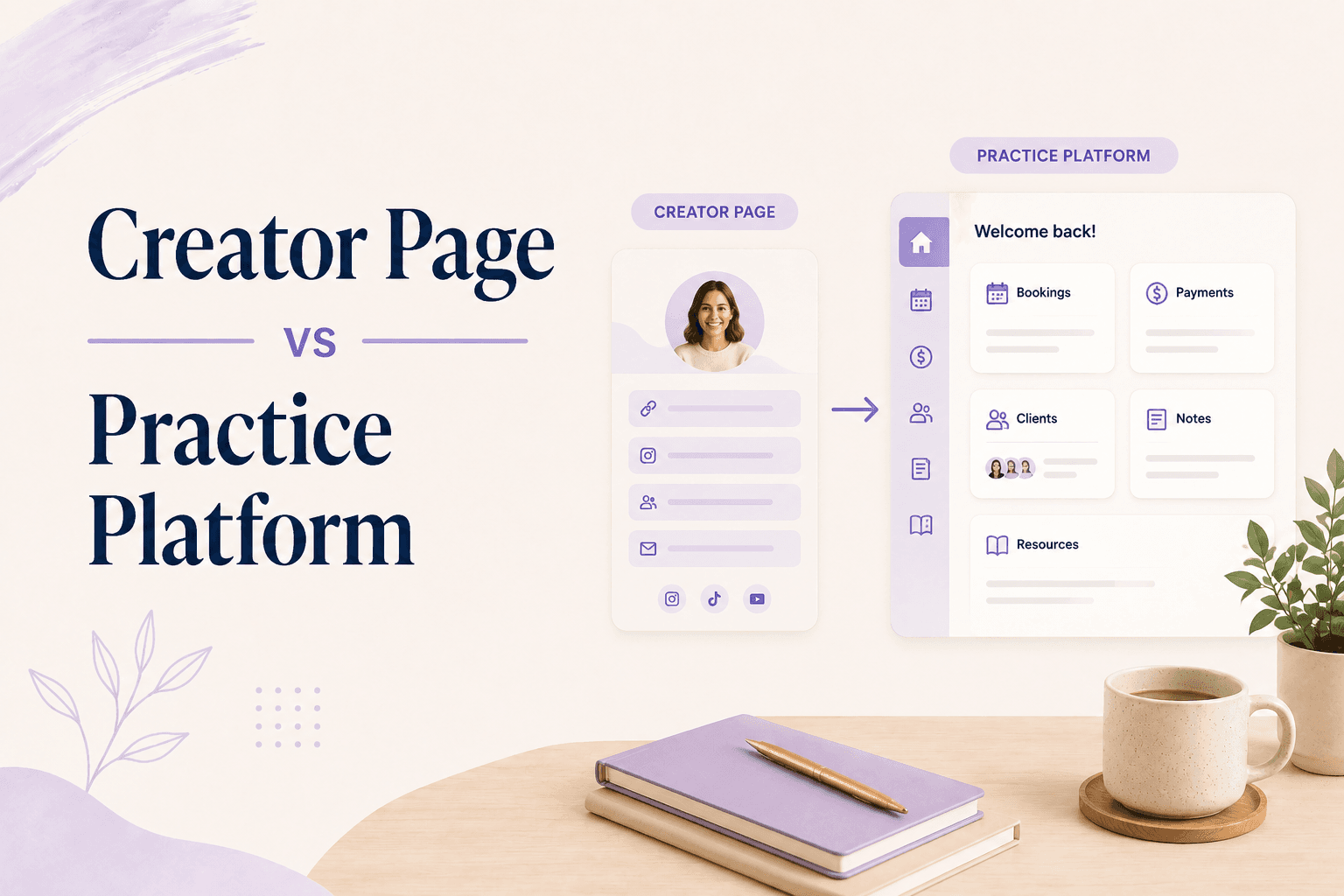
Put a good creator storefront and a good practice platform side by side and you'd struggle to tell them apart. Photo, short bio, a few buttons, a payment form. Both take money in under a minute.
The difference doesn't appear until someone has paid — and for a practitioner, everything that matters happens after that point.
Why do they look the same?
Because they solved the same visible problem: a single link that holds everything you sell, works on a phone, and doesn't need a web designer. Linktree, Stan.store, Beacons, and the practice platforms all landed on the same layout, and the layout is genuinely good.
What the page looks like is the smallest part of what either product does. The rest is invisible from the outside, which is why the comparison is so hard to run before you've committed to one.
What does a creator page assume?
That you're selling to an audience. Someone arrives from a reel, buys a $27 guide or a seat in a workshop, and the transaction is complete. If they buy again in four months, that's a second unrelated transaction.
Everything in the product follows from that: instant checkout, conversion-optimised layouts, minimal friction, no login for the buyer, and no concept of an ongoing obligation. It's the creator economy model expressed in software, and for creators it's exactly right.
What does a practice assume?
That the same person comes back on Thursday, and again in three weeks, and that you'll need to know what happened in between.
A practice runs on availability, packages, cancellation windows, intake, and a record of what each client has bought and used. Those aren't features bolted onto a storefront — they're the substance of the business, and a page that sells well but forgets everyone is no help with any of them.
Where the difference actually shows up
| Situation | Creator page | Practice platform |
|---|---|---|
| Client books a time | External scheduler | Native availability |
| Client returns | New transaction | Same record |
| Six-session package | Sold, then tracked manually | Credits drawn down automatically |
| Late cancellation | Handled by you, by hand | Policy applied automatically |
| "What has this client bought?" | Search your payment records | One profile |
Row three is the one that catches people. Selling a six-session package on a creator page is easy; knowing that Maya has two sessions left is a spreadsheet you now maintain — platforms with real credit systems exist precisely because that spreadsheet gets out of date.
The tipping point
It isn't revenue, and it isn't follower count. It's your second interaction with the same person.
Up to the first sale, a creator page does everything a practice platform does, faster and for less money. From the second interaction onward you're managing a relationship, and the tool has no idea the relationship exists.
Concretely, you've reached it when you're keeping a spreadsheet of who has sessions left, copying booking links into DMs, or checking your payment processor to remember what someone bought. Linktree alternatives for coaches covers the specific tools if you've already decided you're past it.
Pro tip
What you give up by switching
Two real things, and they're worth naming rather than pretending otherwise.
Speed. A creator page is live in ten minutes. A practice setup involves availability, policies, intake, and prices — an afternoon rather than a coffee break.
Impulse conversion. Creator tools are ruthlessly optimised for the person who arrived from a video thirty seconds ago. If most of your revenue is low-priced digital products bought on impulse from social traffic, that optimisation is worth more to you than package tracking, and you should stay where you are.
Which one do you need?
- Digital products, one-off sales, audience-driven → a creator page. It's the right tool and it's cheaper.
- Sessions, packages, and clients who return → a practice platform. The manual work you're absorbing is the product you're missing.
- Both → a practice platform that also sells digital products, rather than two links and two sets of records.
Most practitioners start with a creator page for sensible reasons and stay long past the tipping point, because the page still looks fine — the cost is showing up in your admin hours rather than on the page. Why your website should actually do something makes the same argument from the visitor's side.
Coaching software built around bookings, packages, and client history gives you the same one-link simplicity with a practice underneath it. Merkora is one page publicly and a practice platform behind it — free to set up and see the difference.
Frequently asked questions
What's the difference between a creator page and a practice platform?
A creator page sells a product to a visitor and ends there. A practice platform manages what comes next — scheduling, packages, cancellations, and a client record that persists across purchases. The front end looks alike; the back end is a different product.
Can I run a coaching practice from Stan.store or Linktree?
You can take payments, and plenty of coaches start that way. What you won't get is availability management, package credit tracking, cancellation enforcement, or a client history — those get handled in a spreadsheet or not at all.
When should a coach move from a link-in-bio tool to a practice platform?
When clients start coming back. One-off product sales are what link-in-bio tools do well; a second and third session with the same person is where the missing scheduling and record-keeping start costing real time.
Do I lose anything by moving to a practice platform?
Some speed and some impulse conversion. Creator tools are optimised for a stranger arriving from social media and buying in ninety seconds, and they're very good at it. Practice platforms optimise for the relationship after that moment.