Key Takeaways
- Reminders reliably reduce no-shows, but the effect comes from making rescheduling easy — not from the reminder itself.
- Two reminders (24 hours and 2 hours before) outperform one; a third adds almost nothing.
- A reminder without a one-click reschedule link converts a forgetful client into a no-show instead of a rebooking.
- Most platforms send reminders but don't connect them to your cancellation window, so a client can reschedule for free at any point.
- SMS has far higher open rates than email but costs more and is regulated differently — use it for the 2-hour reminder, not for everything.
In this article
Almost every booking platform on the market sends automated reminders. Almost every practitioner using one still has a no-show rate somewhere between 10% and 20%. Both of those things are true at the same time, which should tell you something about how much work the word "automated" is doing.
Reminders do work. They just work for a narrower reason than most people assume, and the platforms that get results are the ones built around that reason.
Do automated reminders actually reduce no-shows?
Yes — and the effect is well documented across healthcare and appointment-based services. But the mechanism is worth being precise about: reminders mostly convert would-be no-shows into cancellations and reschedules. They don't create attendance out of nothing.
That distinction changes what you should look for in a platform: the value is in what the client can do from the reminder, not in the reminder arriving. A message that says "your session is tomorrow at 3pm" and nothing else gives a client who has a conflict exactly one option — do nothing and feel bad about it.
What does a good reminder sequence look like?
Three messages total, and only two of them are reminders:
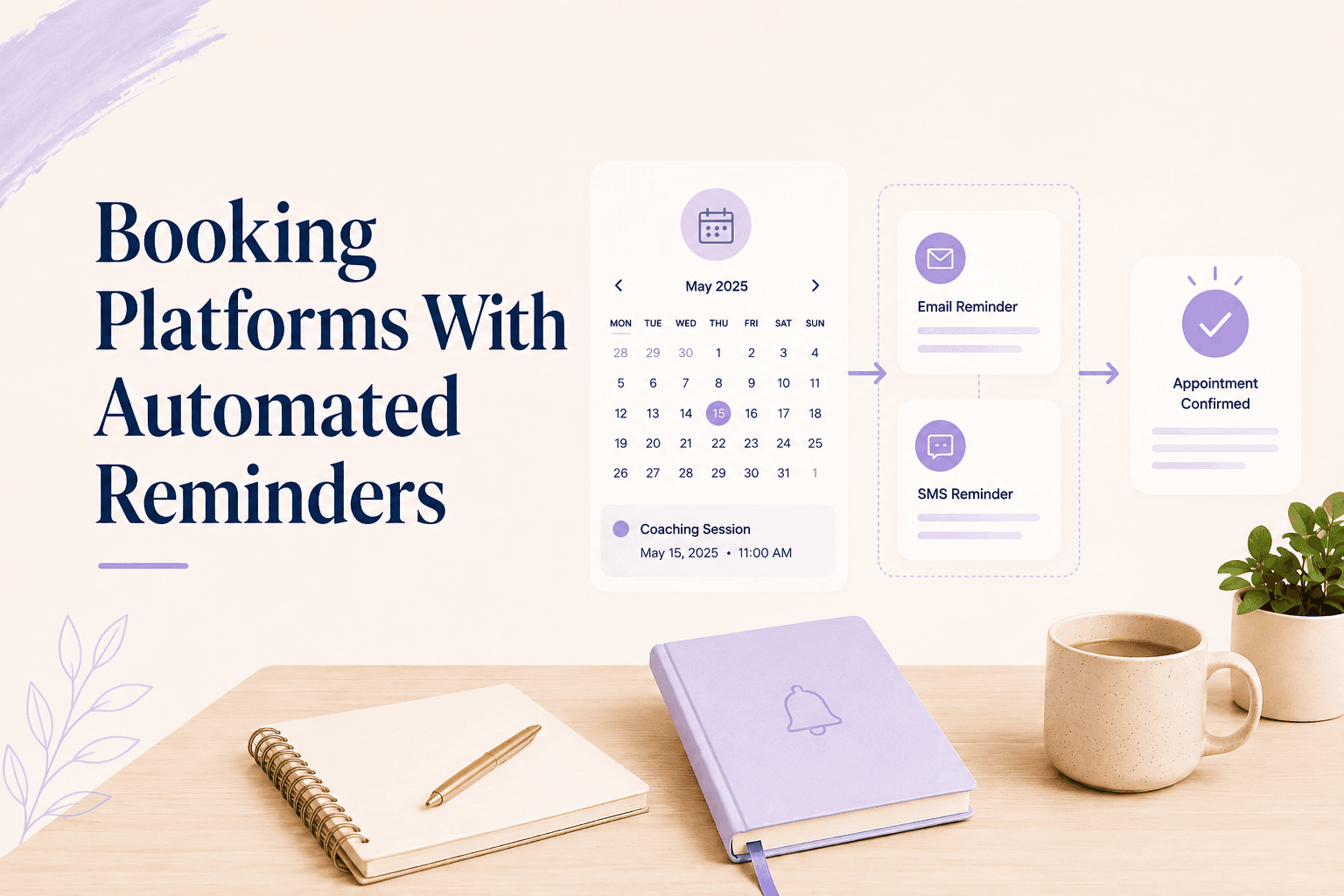
- Immediate confirmation — sent on booking, with date, time, timezone, and a reschedule link. This is where most no-shows are prevented, because it's the message that makes the booking real.
- 24 hours before — enough lead time for the client to move the session if their week has shifted. Include the policy window here if you have one.
- 2 hours before — short, practical, with the join link. This one catches people who genuinely forgot.
Timezone handling is the quiet failure point in all three. If you work with clients across countries, a reminder that displays your timezone instead of theirs will create no-shows rather than prevent them.
Content matters less than people assume, with one exception: the 24-hour message should state what happens if they cancel now versus later. Not as a threat — as information. "You can reschedule free until 3pm today" is a genuinely useful sentence that converts a vague policy into a specific deadline.
Resist adding a fourth message. Reminder fatigue is real, and a client who receives four notifications about a single appointment starts filtering your emails — which costs you the one message that mattered.
Why does the reschedule link matter more than the reminder?
Because the client who receives a reminder and realises they can't make it is at a decision point. If rescheduling takes one tap, they reschedule. If it means emailing you and waiting for a reply, a meaningful share of them do nothing and hope it resolves itself.
Key takeaway
This is also why reschedule and cancel should not be equally weighted. A prominent "Reschedule" button with a smaller cancellation option keeps the client in the relationship. Practical detail: reducing last-minute cancellations depends far more on this than on the wording of your policy.
What do most booking platforms get wrong about reminders?
Three things, consistently:
- The reminder doesn't know your policy. It sends the same message whether the client is inside or outside your cancellation window, so there's no moment where the stakes become clear.
- The reschedule link ignores your availability rules. Clients land on a calendar that lets them book into a buffer or a blocked evening.
- There's no follow-up after a no-show. The session passes, the slot is gone, and the system does nothing — no fee, no rebooking prompt, no record.
There's a fourth, subtler failure: reminders sent from the platform's domain rather than yours. A message from [email protected] lands differently than one from your practice, both in the spam folder and in the client's sense of who they're dealing with. Check what the sender address looks like before you commit.
The no-show follow-up is the expensive gap. A reminder system that ends at the appointment time leaves the entire recovery step to you, which in practice means it doesn't happen. A platform that applies the no-show fee automatically closes the loop without an awkward message from you.
Do SMS reminders beat email?
For the final reminder, yes. SMS open rates are far higher than email and the message arrives where people already are. But SMS costs money per message, is regulated differently across markets, and requires explicit consent in most of them.
The pragmatic split: email for the confirmation and the 24-hour reminder, where links and details matter, SMS for the 2-hour reminder, where getting seen matters. If a platform charges per SMS, check the rate — at two messages per session and a full schedule, it adds up faster than people expect.
For therapy practices there's an extra consideration. An SMS reading "reminder: your therapy session with [name] is at 3pm" may arrive on a shared or unlocked phone. Keep the content minimal — time and a link, no service description — and ask during intake whether the client prefers email only.
| Message | Channel | Job |
|---|---|---|
| Confirmation | Make the booking feel real | |
| 24 hours before | Offer a free reschedule window | |
| 2 hours before | SMS | Catch genuine forgetting |
What to check before you commit to a platform
Book a test appointment as a client and watch what happens. Specifically:
- Does the confirmation arrive immediately, with the client's timezone?
- Can you edit the reminder text, or is it locked to a template with the platform's branding?
- Does the reschedule link respect your buffers and blocked time?
- Does the 24-hour reminder mention your cancellation window?
- What does the system do at the appointment time if the client doesn't show?
Question five is the one that separates a reminder feature from a no-show system. Most platforms have a good answer to the first four and no answer at all to the last — which is worth weighing alongside the wider booking software comparison and the other levers on no-shows.
Therapist software and coaching software that treats reminders as part of a policy — rather than as a notification setting — is what makes the difference measurable. Merkora connects the reminder, the reschedule link, and the cancellation window to the same booking record, so the sequence ends with an outcome instead of a message.
Frequently asked questions
How many appointment reminders should I send?
Two. One at 24 hours before, which gives the client time to reschedule if something has come up, and one at 2 hours before, which catches genuine forgetting. A third reminder adds little and starts to feel like nagging.
Do SMS reminders work better than email reminders?
For the final reminder, yes — SMS open rates are dramatically higher and it's the message that catches people already in their day. Email is fine for the 24-hour reminder because it carries links and details better.
Should reminder emails include a cancellation link?
They should include a reschedule link. Making cancellation the prominent option gives people an easy out; making rescheduling prominent keeps the relationship and the revenue while still letting them move the session.
Can automated reminders enforce a cancellation policy?
Reminders can state the policy, but stating and enforcing are different things. Enforcement needs the booking system to know your cancellation window and apply the fee itself when someone cancels inside it.