Key Takeaways
- Manually charging a no-show fee requires you to notice, decide, and initiate — which means it happens inconsistently.
- True automation needs three things: a card on file at booking, a defined policy window, and a system that charges the fee without your input.
- Calendly and Acuity collect the card but still require you to manually initiate the charge. That's not automation.
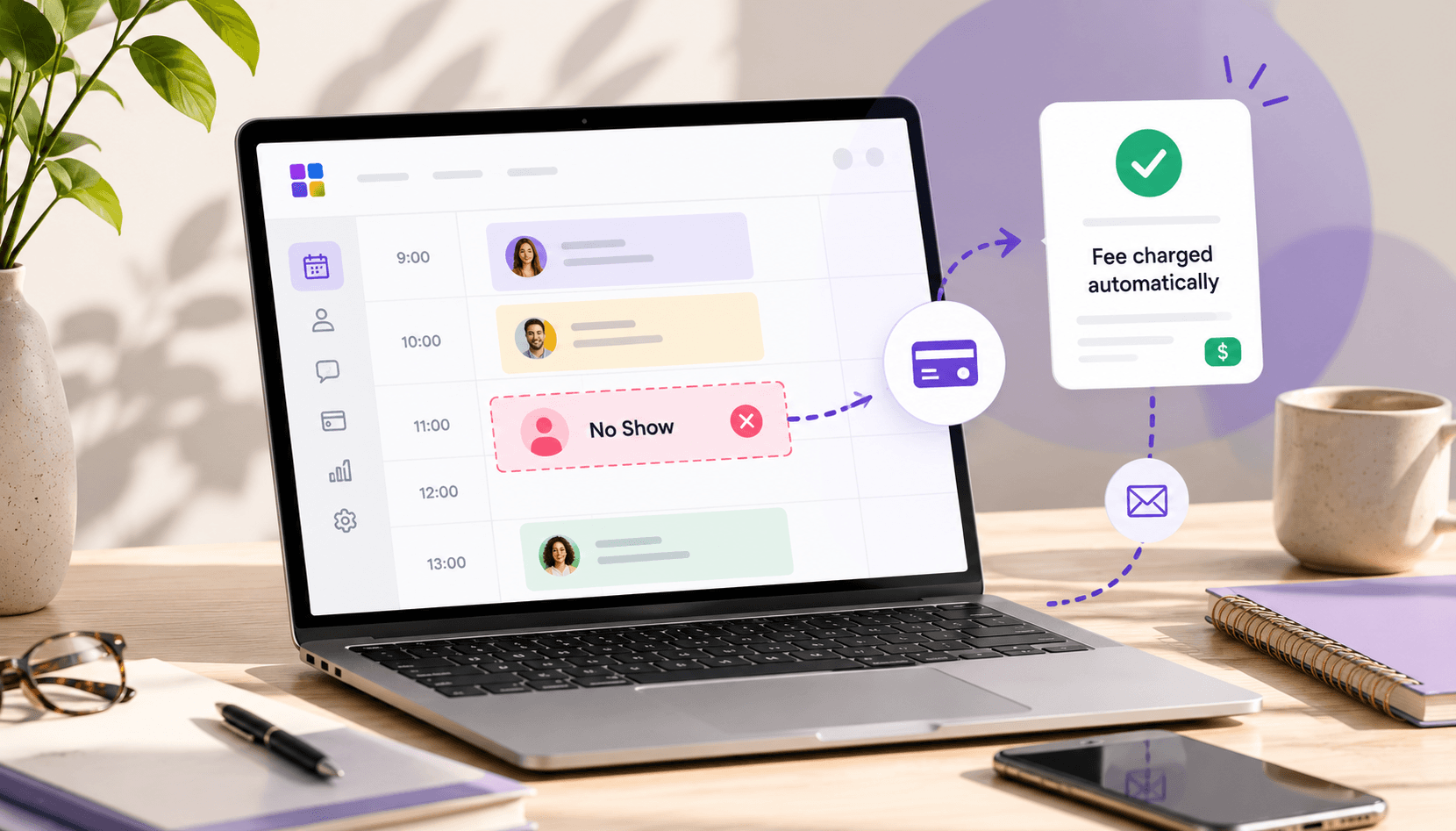
- Merkora charges the fee automatically when a client cancels inside your window — no action needed from you.
- Automated enforcement removes the awkward conversation entirely: the system charged the fee, not you.
In this article
Most therapists and coaches have a no-show policy. Very few enforce it consistently. The reason is almost always the same: charging the fee requires you to notice the no-show, decide to charge it, open a payment system, find the client, and send a manual invoice — all while feeling uncomfortable about it.
The fix isn't better willpower. It's removing the manual step entirely. When enforcement is automatic, the fee happens without you initiating it, which means it happens every time — and clients quickly learn the policy is real.
What "automatic" enforcement actually requires
For no-show fee automation to work, three things need to be true before the appointment:
- A payment method on file — the client's card must be stored at the time of booking, not chased after a no-show
- A defined policy window — the system needs to know when "late" starts (24 hours, 48 hours, etc.)
- Automatic charge logic — the platform must trigger the charge itself when conditions are met, not wait for you to initiate it
Most booking tools handle the first two. Almost none handle the third without manual action.
Option 1: Stripe + manual process (not truly automated)
Some practitioners set up Stripe to save a card on file at booking, then manually charge it when a no-show occurs. This is better than nothing — the card is there — but it still requires you to log into Stripe, find the customer, and initiate the charge. You'll do this inconsistently.
Option 2: Acuity Scheduling (partially automated)
Acuity can require a card on file or upfront payment. When a no-show occurs, the card is there to charge. But Acuity doesn't trigger the charge automatically — you still need to go in and process it manually. One fewer step than Stripe, but not truly hands-off.
Option 3: A platform with built-in enforcement logic
The cleanest solution is a booking platform where the cancellation policy is enforced at the system level — not left to you. You configure your policy window and fee percentage once. When a client cancels inside the window or doesn't show up, the fee is charged automatically. You get a notification. No action required from you.
This is how Merkora handles it. You set your cancellation window (e.g., 24 hours) and your fee (e.g., 50% of the session rate). After that, enforcement runs without your involvement — including on sessions you've forgotten about or days when you're too busy to follow up manually.
How to set it up in Merkora
- Go to your session settings and enable cancellation policy
- Set your cancellation window (how many hours before the session the policy kicks in)
- Set your fee — either a flat amount or a percentage of the session rate
- Clients are informed of the policy at the time of booking and confirm they've read it
- If they cancel inside the window, the fee is charged automatically to the card stored at booking
No conversation needed. No manual invoice. No decision about whether to enforce it this time.
What to tell clients when you switch
If you've been running without enforcement and are now switching to automated fees, communicate it clearly to existing clients before it happens:
"Starting [date], I'm moving to a booking system that automatically enforces my cancellation policy. Sessions cancelled with less than [X hours] notice will be charged [fee]. I'm giving you advance notice so there are no surprises."
Most clients respect this. Those who don't are the exact clients your policy is designed for.
For context on why manual enforcement fails, see Why Cancellation Policies Fail. To compare platforms on this specific feature, see Booking Software With Cancellation Policies. Ready to set it up? Merkora is free to start.
Frequently asked questions
Can Calendly automatically charge a no-show fee?
No. Calendly can display a cancellation policy, but it has no mechanism to automatically charge a fee. You would need to manually initiate the charge in Stripe or another payment tool after a no-show occurs.
How do I set up automatic no-show fee enforcement?
You need a booking platform that connects payment collection at booking to cancellation detection. In Merkora: set your cancellation window and fee percentage in settings. When a client cancels inside the window, the stored card is charged automatically.
Is it legal to automatically charge a no-show fee?
Yes, provided the client agreed to the policy at the time of booking. The key is explicit confirmation — the client should actively confirm they've read and accept the cancellation policy before completing their booking.
What should I tell clients about automatic no-show fee enforcement?
Be direct at booking: 'Sessions cancelled with less than [X] hours notice are charged [fee] automatically.' Most clients respect clear, consistent policies. Frame it as professional practice management, not a punishment.